

ASIO4ALL Windows 10 compatibility
The official download page lists Windows 10 as the minimum required operating system for ASIO4ALL 2.22. The release notes also describe Windows 10 as officially supported. That makes 2.22 the appropriate starting point for an up-to-date Windows 10 workstation, whether the audio endpoint is built into a laptop or connected through USB.
ASIO4ALL is not a replacement for a device maker's native ASIO driver. If a professional interface has a maintained Windows 10 driver from its manufacturer, install that first. Native drivers often provide more reliable clocking, direct monitoring, routing, firmware integration, and access to every hardware channel. ASIO4ALL is most valuable when a device exposes only Windows WDM audio.
| Question | Windows 10 answer | Action |
|---|---|---|
| Latest version | ASIO4ALL 2.22 | Use the official 2.22 installer, released July 23, 2026 and verified July 29, 2026. |
| 64-bit support | Supported by the standard installer | Do not search for an unofficial x64 repack. |
| Restart required | Usually no | Close and reopen the DAW; restart only if detection fails. |
| Native interface driver available | Usually preferred | Compare stability and device-specific features before choosing ASIO4ALL. |
Download and install ASIO4ALL on Windows 10
Before installation, close the DAW and other applications that may be using the intended audio input or output. Use the download button on this page and wait for the 15-second source check. The browser then opens the verified official executable rather than a mirror or software download manager.
Run the installer, review the prompts, and finish setup. Reopen your DAW, select ASIO4ALL v2, and open its control panel. Enable the desired input and output, then begin with a moderate buffer. Version 2.22 installs Offline Settings automatically, so an old tutorial that asks you to select that component is no longer current.
- Verify the filename
The current official file is
ASIO4ALL_2_22.exeand was approximately 544 KB when checked. - Complete the setup wizard
Use the standard installer options. Do not enable unrelated driver updater offers from a third-party page.
- Choose ASIO4ALL v2
Open the DAW audio preferences and select the newly installed driver.
- Configure endpoints
Turn on only the Windows input and output needed for the project.
- Test at 256 samples
Lower the buffer for tracking if stable; raise it for dense mixing sessions.

Configure the Windows 10 audio device
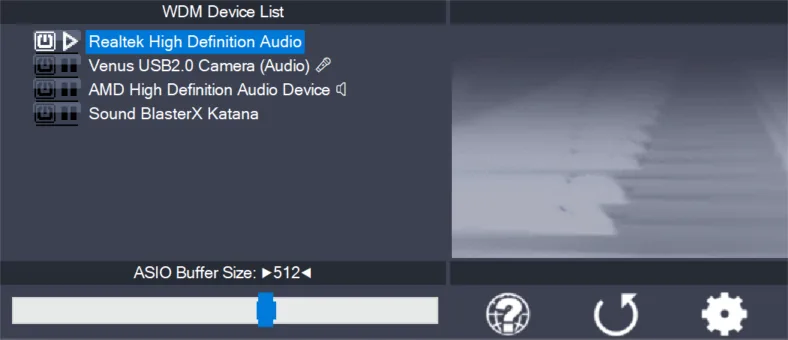
Open the ASIO4ALL control panel from the DAW or from Offline Settings. The simple view lists available WDM devices; advanced view exposes more endpoints and synchronization options. Select the exact speakers, headphones, microphone, or line input you intend to use. Activating every device at once can create clock and format conflicts, so start with a minimal route.
Set the DAW project sample rate to a value supported by the device. A mismatch between 44.1 kHz and 48 kHz can make an endpoint unavailable or require resampling. Begin with a 256-sample buffer for general work. Live software monitoring may benefit from 128 or 64 samples on a capable computer, while large mixes often run more reliably at 512 or 1024 samples.
Windows audio enhancements, exclusive access, and communications settings can change endpoint behavior. If the device works in ordinary Windows playback but not in ASIO4ALL, close other applications, turn off unnecessary enhancements for a test, and make sure the endpoint is not disabled in the Sound control panel.
Troubleshoot Windows 10 driver problems
When ASIO4ALL is missing from the DAW, confirm the program actually supports ASIO and then restart the program. If it remains missing, reinstall the current official build. When the driver appears but produces no sound, inspect the power icon beside the output and close programs that could be holding it.
Crackles, pops, and short dropouts usually mean the system cannot finish audio processing within the selected buffer. Increase the buffer, temporarily bypass CPU-heavy plugins, and avoid aggregating unrelated devices. When recording through USB, connect directly to the computer during diagnosis rather than through an unstable unpowered hub.
If Windows 10 itself is no longer receiving security updates on your edition, consider the operating-system risk separately from ASIO4ALL compatibility. A working audio driver does not make an unsupported Windows installation secure.
- Driver absent: reopen the DAW and confirm it supports ASIO.
- Device unavailable: close browsers, communication apps, and other audio hosts.
- Clicks or distortion: raise the buffer and match sample rates.
- USB instability: test another port and remove unnecessary hubs.
- Multiple devices drift: use one clocked interface where possible.
ASIO4ALL Windows 10 setup checklist
Complete an ASIO4ALL Windows 10 setup checklist before deciding that the driver or computer is unstable. Start with one wired output and, if needed, one recording input. Match the project sample rate to the Windows device format, close browsers and communication apps, and select a 256-sample buffer. Play a project that represents your normal plugin load rather than testing only an empty session.
Next, record at least thirty seconds and play the take back. A clean test confirms that input routing, output routing, and timing work together. If dropouts occur, raise the buffer before changing resampling or kernel-buffer controls. Reopen the DAW after saving the settings to confirm that the endpoints remain available. This ASIO4ALL Windows 10 setup checklist separates a repeatable configuration from a temporary result caused by another program releasing the device.
- Keep Windows enhancements disabled while isolating unexplained distortion.
- Test USB audio directly on the computer instead of through an unpowered hub.
- Write down the working endpoint names, sample rate, and buffer size so another project can restore the same tested baseline across future recording sessions and projects.
ASIO4ALL Windows 10 FAQ
What is the latest ASIO4ALL for Windows 10?
ASIO4ALL 2.22 is the latest official release verified for this guide. It was released on July 23, 2026.
Can I install ASIO4ALL on Windows 10 64-bit?
Yes. Use the standard official 2.22 installer. A separate unofficial 64-bit package is not required.
Why is ASIO4ALL not showing in Windows Sound settings?
ASIO4ALL is normally selected inside an ASIO-capable host, not as an ordinary Windows playback device in the taskbar sound list.
Should I uninstall my Realtek driver?
No. ASIO4ALL uses Windows WDM drivers such as the Realtek driver underneath. Removing the device driver can remove the endpoint ASIO4ALL needs.
Can ASIO4ALL reduce latency on Windows 10?
It can provide an ASIO path and smaller buffers for compatible devices, but stable latency still depends on the hardware, WDM driver, CPU load, sample rate, and buffer setting.
Get ASIO4ALL 2.22, then return to this guide for setup.
The official download opens after a 15-second source check.